Live Collaboration
Live Collaboration lets your whole team edit in the editor together, in real time.
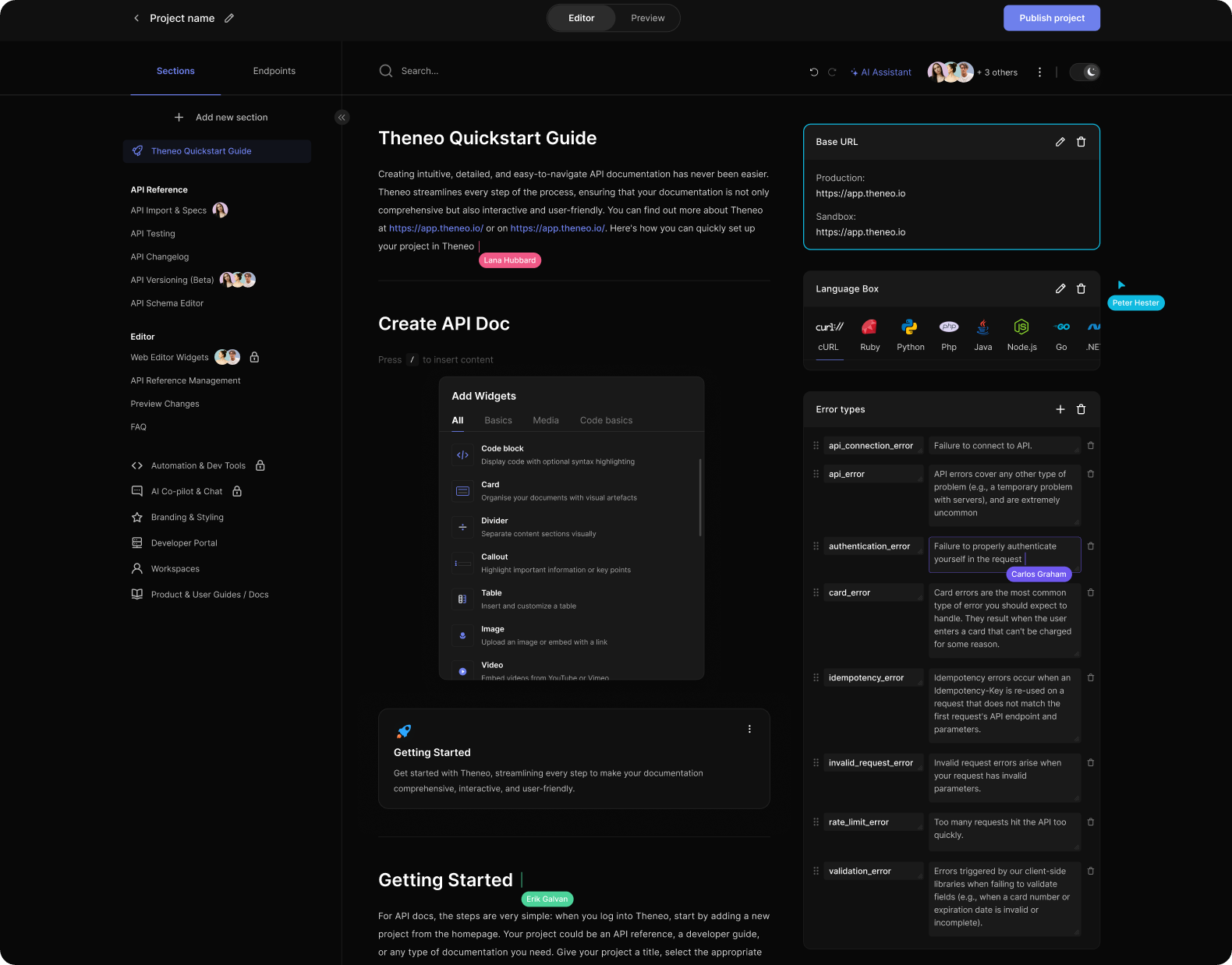
What you can see, live
- Who's editing a section: at any moment, see which collaborators are actively working in a section, avoiding confusion and duplicated effort.
- Where others are editing: the editor highlights the exact text another user is changing, giving you instant feedback on what’s being updated.
- Collaborator cursors: see a teammate’s cursor within a section description, so you know precisely where edits are happening.
- Section activity in the menu: the menu shows who’s editing which section, marked with their name, invaluable for large documents with many sections.
How to use it
- Start editing together: once collaborators are invited to a project, they can edit simultaneously. The moment someone starts, others see their presence in real time.
- Coordinate effortlessly: real-time presence indicators keep everyone aligned; pair them with your team’s chat tools for even smoother coordination.
- Avoid conflicts: because everyone can see who’s working where, edits consolidate cleanly without accidental overwrites.
Was this section helpful?


On this page
- Live Collaboration