AI Co-pilot (Technical writer)
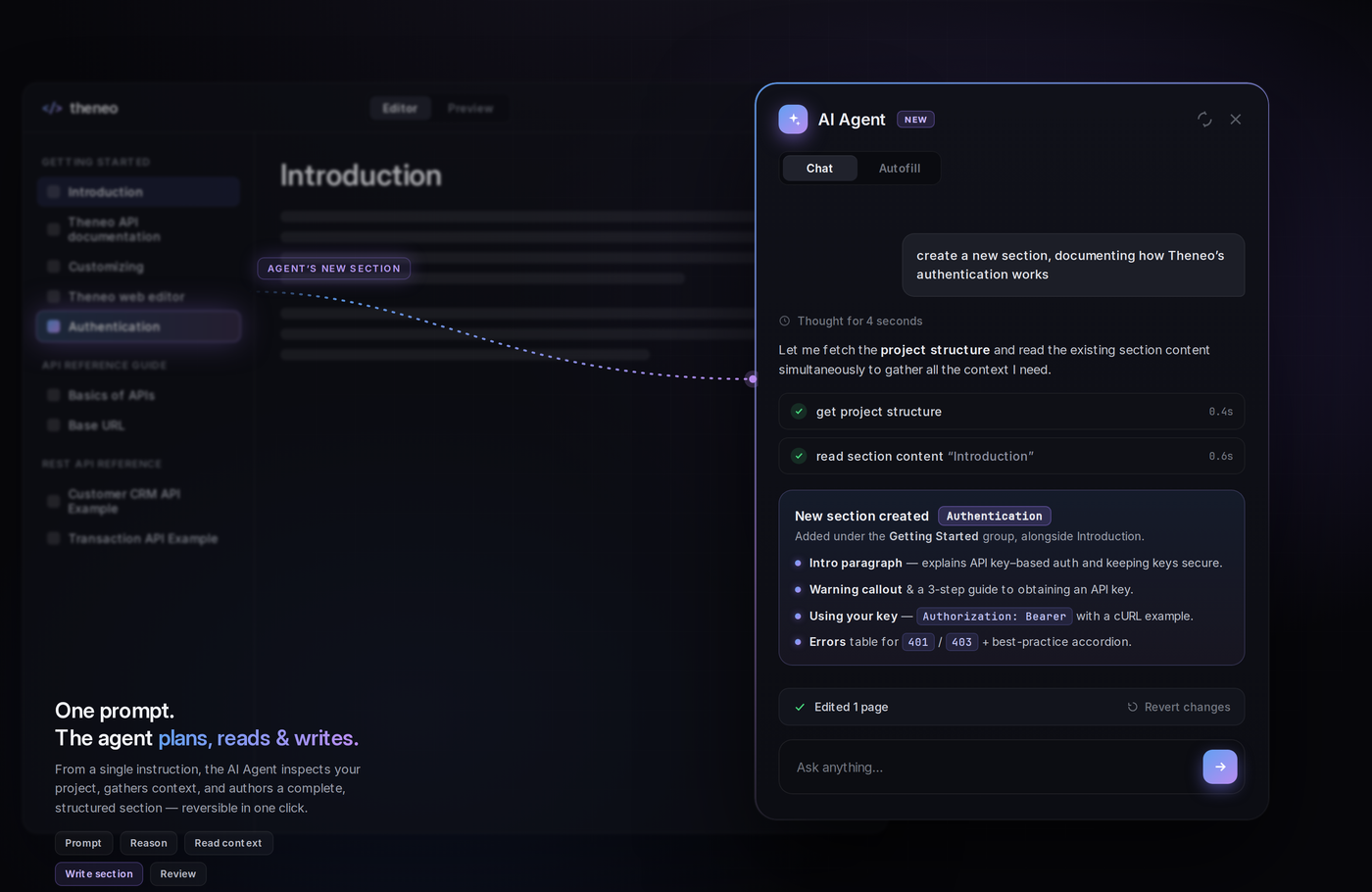
The AI Co-pilot has grown into a full AI Agent that lives inside your editor. Give it a prompt, any prompt, and it writes new content, fills in gaps, restructures sections, audits your docs, and much more.
Think of it as a technical writer, editor, and reviewer on call, right where you work.
1. Choose your starting point at project creation
When you create a project, you still decide how much the AI should do up front:
Full AI Assistance
The AI writes fresh content for every part of your docs, replacing existing descriptions for a consistent, engaging result.
Enhance Existing Content
The AI fills in the gaps, adding what is missing without touching what you have already written.
No AI Assistance
Keep full manual control. Your existing documentation stays exactly as it is.
Changed your mind? The AI Agent inside the editor works on any project later, whatever you picked here.
2. Meet the AI Agent inside the editor
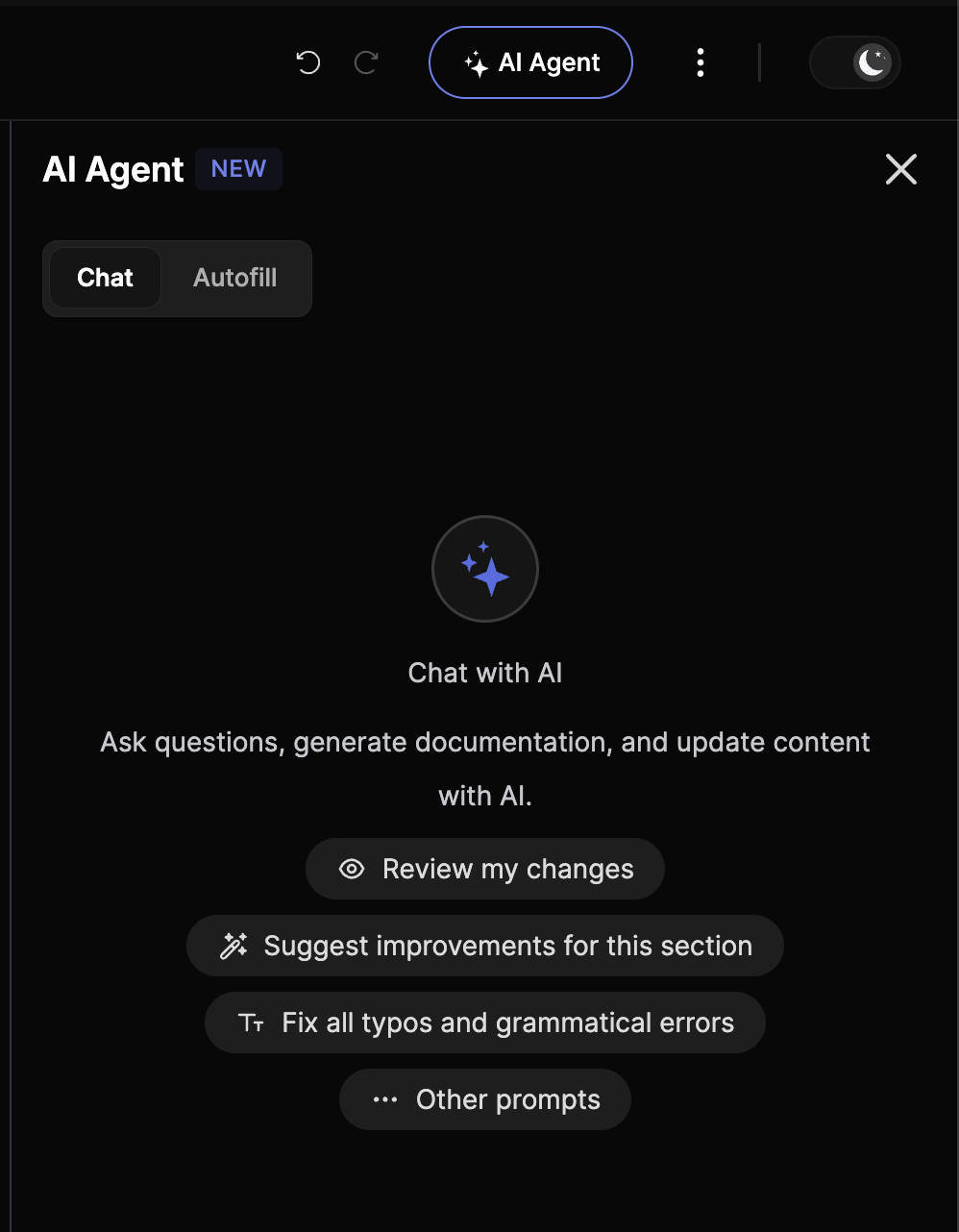
Open the AI Agent from the editor's top bar. It is a conversation: type any prompt and watch it work across your documentation, from a single description to an entire project.
Two ways to work
Point the Agent at your API spec and let it complete descriptions for every header, body field, parameter, and response in one pass.
Ask questions, generate documentation, and update content through a natural back-and-forth. Tap a quick action or just type in Ask anything to get going.
What you can ask it
The Agent handles the whole documentation lifecycle. A few of the things it does:
Generate and rewrite
Write a brand-new section from a prompt, or rewrite an existing one in your voice.
Create new sections
Say what you need, like a Getting Started guide, and the Agent builds the section for you.
Audit your docs
Ask it to review the whole project for gaps, inconsistencies, and quality issues.
Fix typos and grammar
Clean up spelling and grammatical errors across a section in one shot.
Suggest improvements
Get targeted suggestions to sharpen the section you are working on.
Review your changes
Have the Agent look over recent edits before you publish.
How to use it
1
Open the AI Agent
Click AI Agent in the editor's top bar to open the side panel.
2
Pick a mode
Choose Chat for a conversation or Autofill to complete an API spec.
3
Prompt it
Type anything in Ask anything, or tap a quick action like Review my changes, Suggest improvements for this section, or Fix all typos and grammatical errors.
4
Review and apply
The Agent shows what it changed, so you stay in control before anything is published.
Example
Documenting an order-creation endpoint with a body parameter like idempotency_key? Ask the Agent to explain it, and it suggests: "Provide a unique key to prevent duplicate orders on network failure", instantly clarifying its purpose for your consumers.
Working at a bigger scale? Prompt it with "Audit this project and list every endpoint missing a description" and it returns a checklist you can act on.
Why it matters
Speed
Dramatically cuts the time to write and update documentation.
Consistency
Keeps language and style uniform across every section.
Accuracy
Generated content is precise, reducing errors and misunderstandings.
Focus
Frees you to concentrate on API design instead of documentation.
The AI Agent keeps your API documented thoroughly, accurately, and clearly, while you stay focused on building.
FAQ
Does the AI Agent work on any project?
Does the AI Agent work on any project?
Yes. Whatever assistance level you chose at creation, the Agent is available in the editor for every project.
Will it overwrite my content?
Will it overwrite my content?
Only when you ask it to. The Agent shows what it changed so you can review before anything is published.
Can it create whole sections?
Can it create whole sections?
Yes. Ask it to add a section and it builds the structure and content for you.
How is it different from the AI Writer widget?
How is it different from the AI Writer widget?
The AI Writer widget continues and expands prose inline as you type. The AI Agent is a project-wide assistant you direct with prompts.
Prefer to write inline? The AI Writer widget continues, simplifies, and expands prose anywhere in the editor.


On this page
- AI Co-pilot (Technical writer)